scope01 has been working for janolaw AG in Sulzbach (Taunus) for several years. The company is an online provider of legal documents. janolaw offers legally compliant texts for websites and online shops. In the past, scope01 has already provided support and maintenance for the interface to the OXID eShop system.
As part of two new projects, the Frankfurt-based internet agency has now developed a general janolaw API and an interface for Shopware 6.
With the help of the new API, legal information is kept and provided independently of systems. The respective systems then access the API via interfaces (plugins, extensions), retrieve the information, and connect to it. The API then actively distributes (pushes) the legal texts to the connected shops at intervals.
A major added value is the ongoing updating of the texts. For example, a shop operator no longer has to worry about the current status of the imprint, data protection, right of withdrawal, and terms and conditions. This is because the content is updated automatically. In addition, janolaw offers warning protection for online retailers.
An account with janolaw is required to access the API. The necessary user management is also integrated into the API.
Janolaw API
An overview of the technical details of the new API development:
- Registration: The respective shop sends a request (request with callback) to the API. The API checks whether the URL can be accessed, is functioning correctly, and has not already been registered. If everything is in order, the shop is registered in the API and receives a unique authentication token. This token also forms the basis for all further communication. API activation also takes place via this token.
- Activation: To activate the API, the shop operator logs into the janolaw plugin configuration via a link in their janolaw account using the backend of their system and selects the appropriate account. This links the token to the account. The API is now activated and ready for the integration of legal texts.
- From this point on, the API will regularly provide current legal texts. The distribution of this content to the connected shops is carried out automatically via the API using a push process.
- If regular updates are not sufficient, the shop can also send an update request to the API manually. The prioritization and processing of the request takes place in the API in a scheduler.
- When the legal texts are updated by janolaw, janolaw itself also has the option of activating this distribution (pushes) to ensure that the legal texts are always up to date.
A large number of shop systems will communicate with the janolaw API in the future in order to retrieve current legal information and receive it via push notifications. In addition to the initial connection of Shopware, other shop systems such as Magento, epages, and Shopify, as well as content management systems such as WordPress, Joomla, and Drupal, will also be connected in the future.
Shopware 6 Plugin
scope01 from Frankfurt am Main has developed the new Shopware 6 plugin for janolaw. It is available for download in the Shopware Store.
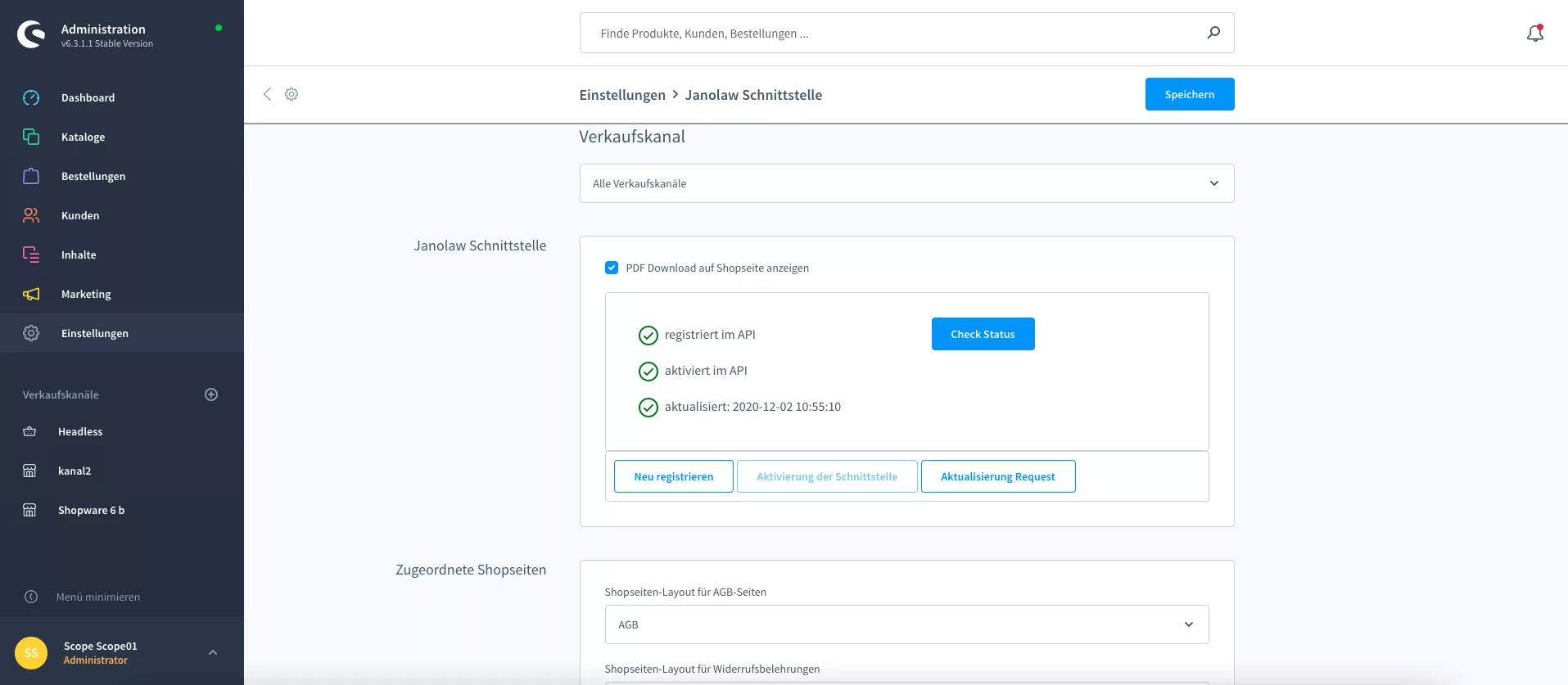
The Shopware plugin is the counterpart (client) for accessing the janolaw API from Shopware. To do this, the shop operator can simply create and configure the relevant categories and pages in Shopware.
It is also possible for each sales channel in Shopware 6 to have its own legal texts. This only requires separate registration and activation of the sales channel in the API. Otherwise, the “All sales channels” setting is the default.
After successful registration, an authentication token is saved, an activation link is generated, and a button for activation is provided in the Shopware backend. The shop operator can then use this button to activate the retrieval.
The plugin now receives the API calls from janolaw and updates the shop pages for legal texts in the Shopware shop depending on the sales channel and language.
Legal texts can also be sent as PDF documents, for example in emails. For this reason, PDF documents are automatically saved in the Shopware media management folders.
How can I integrate janolaw?
Integrating janolaw is child’s play and can be done in the following steps:
- Order the right janolaw product on the website.
- After logging in, fill out a questionnaire with the most important questions about your online shop and your company.
- Install the free Shopware 6 plugin from the Shopware Store.
- After that, the legally compliant documents will be available to you.
- Set up the plugin based on the manual.
scope01 will continue to be responsible for further development, support, maintenance, and updates related to the plugin.
Shopware references

thyssenkrupp Plastics
Shopware & Pimcore for thyssenkrupp Plastics

Franz Mensch
Pimcore & Shopware

Forum Publisher
E-commerce with Shopware 6

Curchod Tools
Online store in Switzerland

Leica
International e-commerce

Gardeur
Fashion online store

Wocken
B2B Commerce with Shopware

Moze Shisha
Shopware success story

BS Rollers
Shopware & Pimcore in 3 months
Shopware News

Security & performance for your online store – with our Shopware security check
What is Shopware? The basis for successful online stores!