
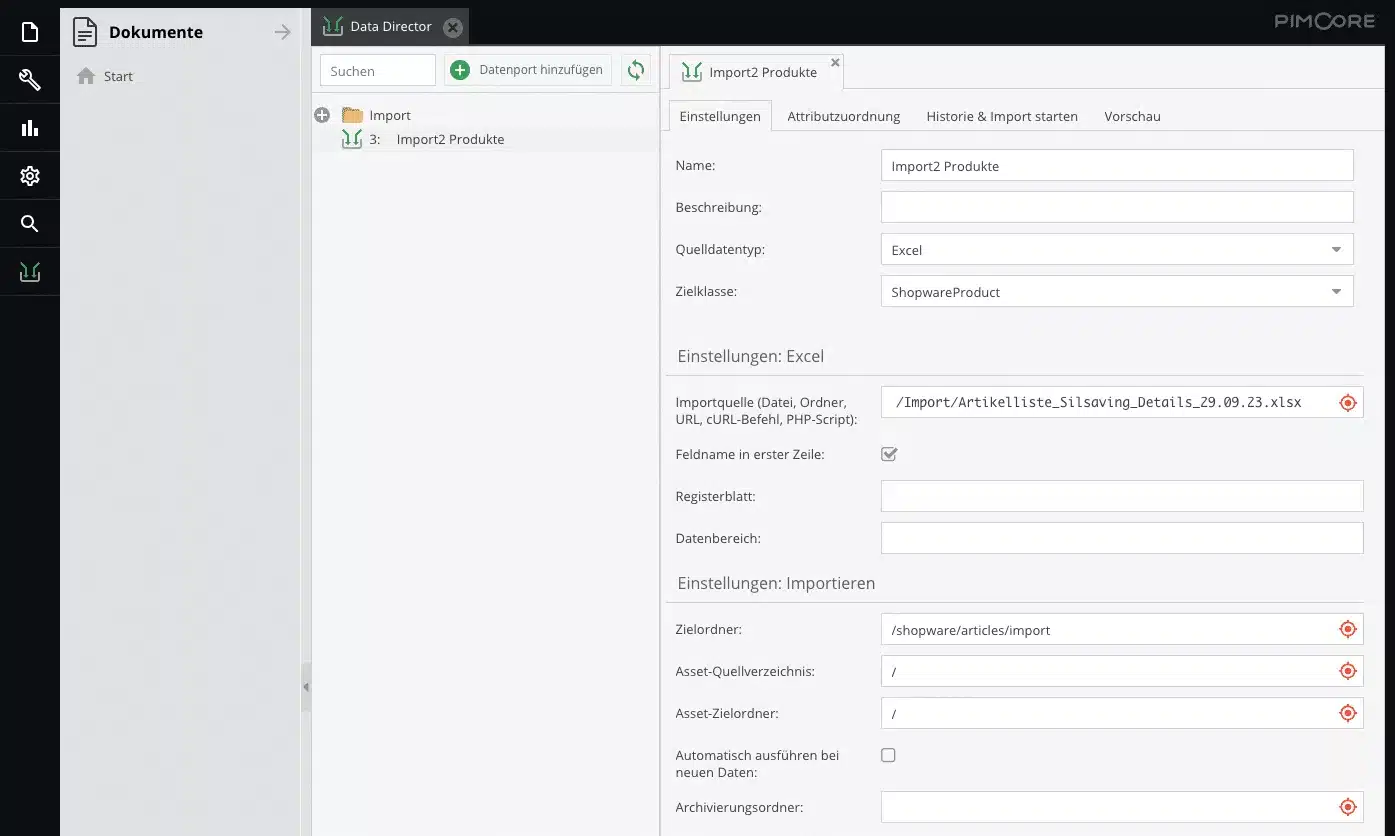
Data Director is an extension for Pimcore that we at scope01 use in most of our projects for importing data. In the following article, our colleague Dominik analyzes the advantages of Data Director compared to importing data directly into Shopware:
Importing product data is crucial for companies that sell products online or present them through various sales channels. There are many reasons for importing product data, including:
-
-
- Updating a large amount of product data
If you want to adjust a large number of products at once, it can be extremely time-consuming and error-prone to make changes to each product individually. In this case, it is often more effective to export the desired data, then adjust it in Excel, for example, and then import the data again. This also makes it possible to prepare the changes and then roll them out at a specific time, for example at the start of a special campaign.
- Updating a large amount of product data
-
- Importing data from other providers
Companies that receive data from suppliers, manufacturers or other third-party providers can easily integrate it into their system by importing it.
- Importing data from other providers
-
However, when importing data from other systems in particular, the problem quickly arises that the data is not available in the required format. Converting the data is then a very error-prone and time-consuming process, in which even the smallest errors can have an enormous impact on the quality of the data.
In order to import product data into Shopware, in addition to the import and export function integrated in Shopware, there is also the option of first importing the data into Pimcore using the Pimcore extension Data Director. From there, the imported data can be transferred to Shopware using the scope01 interface. But why take this detour when you can import the data directly into Shopware?
Shopware
Shopware is a popular e-commerce platform that enables companies to create and manage user-friendly and appealing online stores. The platform includes a wide range of features to cover the entire e-commerce process, including product presentation, shopping cart, order processing, payment processing, and more.
If Shopware’s range of features is not sufficient, it is easy to expand its functionality. Thanks to its excellent expandability, numerous ready-made extensions and themes are already available. These can be used to quickly and easily add additional features to the online store. This allows the store to be optimally adapted to individual needs.
Another advantage of Shopware is its user-friendliness and focus on content management. The intuitive user interface makes it easy to manage products, add images, update descriptions and prices, and manage inventory.
Pimcore
Pimcore is a versatile open-source platform that helps companies efficiently manage, organize, and present their digital assets and product information. The platform combines product information management (PIM), digital asset management (DAM), customer data management (CDP), and content management system (CMS) in one integrated solution.
With Pimcore, companies can centrally capture, update, and manage their product information. This includes product descriptions, technical data, images, videos, and other content you need for sales and marketing. You can then export the data managed in this way to other systems that require it. Pimcore’s flexibility enables companies to develop customized solutions that meet their specific requirements.
The open-source nature of the platform allows developers to customize and extend it to create seamless integrations and individual features. In addition to individual customizations, ready-made extensions are also available, such as the Data Director extension or the Shopware interface from scope01.
Data Director
The Pimcore extension Data Director from the Blackbit agency is a powerful tool when it comes to exporting data from Pimcore or importing it into Pimcore. It supports many common file formats, such as .csv files, .xml files, and Excel files (.xlsx). In addition, the data can also be output directly as the result of an API call, e.g., in JSON format.
Data Director offers extensive options for customizing the data during the import or export process according to requirements. In addition to numerous pre-integrated customization options, Data Director also offers the possibility of integrating your own code, so there are virtually no limits to the customizations you can make. This means that both simple adjustments, such as converting text to lowercase or replacing/removing parts of text, and complex adjustments, such as loading data from existing Pimcore data based on an ID in the file to be imported, can be carried out without any problems. It is also possible to translate text content automatically.
Another strength of Data Director is its ability to support users during the configuration of import and export profiles. In many places, suggestions that match the current configuration are made to the user or, in some cases, automatically preselected. In addition, sample results and their processed results are displayed to the user, if available, so that the user can immediately see whether the configuration will lead to the desired result. Finally, there is the option of first testing the import on individual data records from a file or on a single Pimcore object, instead of having to work with the sometimes huge amount of data right away.
Pimcore PIM interface from scope01
With the help of the Pimcore PIM interface from scope01, data maintained in Pimcore can be transferred to the Shopware system. When changes are made to the data in Pimcore, these changes can be automatically transferred to Shopware without any problems.
In addition to the functionality for transferring data to Shopware, the scope01 interface also includes all the necessary configurations in Pimcore to map entities, such as a product, in accordance with Shopware requirements. All fields that are available in Shopware Standard are therefore also available directly in Pimcore.
Shopware import and export
As part of its user interface, Shopware also offers the option of exporting data such as product data as a .csv file and importing this .csv file again. The data is transferred to the corresponding database fields exactly as it is listed in the file. You can also map relationships between entities (e.g., product to tax rate) in Shopware import and export.
However, for the import into Shopware to work, the data must be in the format required by Shopware.
Data Director, Pimcore and the scope01 interface
By connecting the aforementioned systems, it is possible to benefit from all of their advantages and strengths:
When importing product data using Data Director, a wide range of supported file formats are available. You can also customize the data as you wish. This means that it hardly matters what format and structure the data is in.
If desired, the imported data can then be checked again in Pimcore and subsequently transferred to Shopware using the Scope01 interface. Depending on the configuration, the data can also be transferred automatically to Shopware immediately after import, without the user having to do this manually.
Advantages and disadvantages of the import options
-
Function Shopware Import Product data import using Data Director, Pimcore and the scope01 interface Import of product data from a .csv file ✅ ✅ Import of product data from an Excel file ❌ ✅ Import of product data from an .xml file ❌ ✅ Import of product data from a .json file ❌ ✅ Import of relationships to other entities ❌ ✅ Adjusting the data during the import ❌ ✅ Translate the data into all required languages during import ❌ ✅
Conclusion on the Data Director
In summary, it can be seen that importing directly into Shopware is really only suitable if the data has been exported from Shopware beforehand. If only manual changes need to be made to existing data, Shopware export and import is sufficient.
However, if data is to be imported from other systems or data providers, Shopware’s export and import functions quickly reach their limits, as this data does not usually meet the necessary requirements. Thanks to the flexibility of Data Director, you can overcome these limitations, allowing you to import almost any data using the Data Director Pimcore approach, regardless of the format in which it is available. For importing data from other systems or other companies, the combination of Data Director, Pimcore, and interface is a powerful solution.
We would be happy to show you how to optimally import your data into Shopware or Pimcore.
Pimcore references

thyssenkrupp Plastics
Shopware & Pimcore for thyssenkrupp Plastics

Franz Mensch
Pimcore & Shopware

Leica
International e-commerce

Hikoki / Metabo
Serviceportal with pimcore

BS Rollers
Shopware & Pimcore in 3 months

Curchod Tools
Online store in Switzerland
